MCP Server
hakka mcp is a stdio MCP server that connects to a running Hakka bridge hub. Traffic captured by your app, from a web overlay, a Next.js server, or a React Native / iOS / Android app, flows into an in-process ring buffer the agent can query, and control commands from the agent flow back to the app.
your app ⇄ bridge hub ⇄ hakka mcp ⇄ Claude Code (or any MCP client)It is pull-based: agents call tools on demand. There are no push notifications when new traffic arrives.
The loop
Section titled “The loop”It closes the debugging loop:
- See — list, search, and pull full requests and bodies.
- Diagnose — one call ranks the failures, slow requests, and likely causes.
- Change — mock, block, redirect, breakpoint, or throttle a request in the running app to test a fix.
- Reproduce — package the failing request, the mocks that replay it, and a generated regression test into one bundle.
A worked example, driving Claude Code:
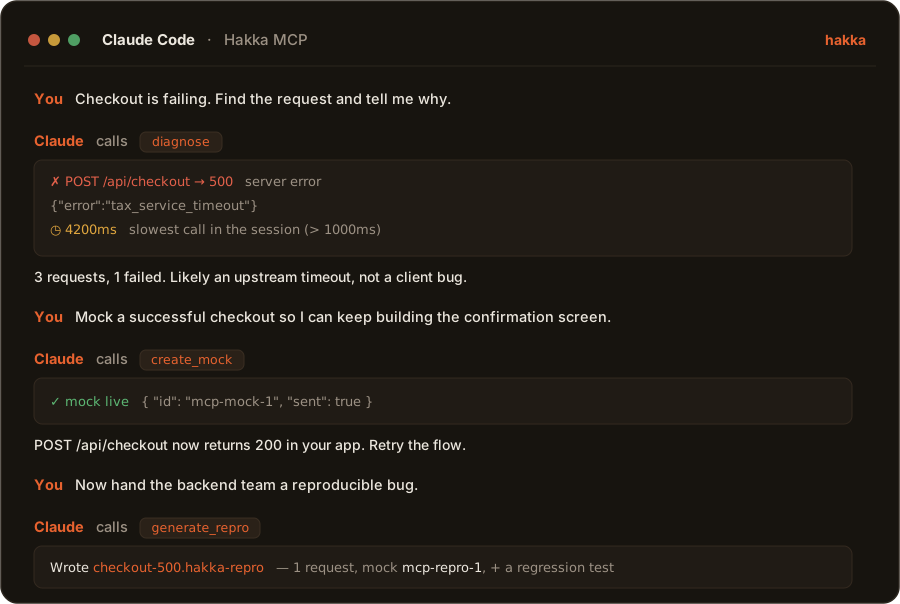
Hakka ships this loop as a ready-made command. Drop /hakka-debug into your project’s .claude/commands/, then run /hakka-debug checkout is 500ing.
-
Add Hakka to your app
Your app streams captures to a bridge hub over
ws://localhost:8989(the default). Follow the install guide for your platform. Web, Next.js, React Native, iOS, and Android all ship a bridge client and the in-app control engines the write tools drive. -
Register
hakka mcpwith your agentTerminal claude mcp add hakka -- npx -y hakka mcpOr add it by hand to
.mcp.json(project) orclaude_desktop_config.json(desktop app):.mcp.json {"mcpServers": {"hakka": {"command": "npx","args": ["-y", "hakka", "mcp"]}}}Add
"--port", "9000"toargsto use a non-default port, and point your app’s bridge at the same port. -
Run your app and agent, then ask
Start your app so it makes at least one request, then ask your agent to call
diagnoseorlist_requests. You should see your traffic. Order does not matter: the app andhakka mcpboth reconnect to the hub automatically.
Dead-simple mode
Section titled “Dead-simple mode”By default hakka mcp hosts a bridge hub in-process, so a single npx hakka mcp is enough — there’s no separate hakka-bridge process to run. If a hub is already running on the target port (hakka-node embeds one, or you started npx hakka-bridge yourself), hakka mcp detects the taken port and connects to that hub as a client instead. Either way your app points its bridge at ws://localhost:8989.
hakka mcp # host a hub on :8989 if free, else connect to ithakka mcp --url ws://host:8989 # explicit bridge URL (remote hosts are never hosted)hakka mcp --port 9000 # shorthand for ws://localhost:9000hakka mcp --no-serve # never host a hub; only connect as a clientNineteen tools, grouped by what they do. The see and diagnose tools only observe the buffer. The change tools send fire-and-forget control commands over the bridge to the connected app(s) and take effect in dev builds only. The reproduce tools return generated artifacts for the agent to write to disk.
| Tool | What it does |
|---|---|
list_requests |
Paginated, newest-first list (limit 1–500, offset). |
get_request |
A single request by id, with full headers, body, and timing. |
search_requests |
Filter by method, status (minimum code), urlContains, runtime, errorOnly, plus the advanced query DSL. |
stats |
Aggregate counts: totals, error rate, status-code and method breakdown, slowest. |
clear |
Empty the in-memory store. Does not disconnect the bridge or stop capture. |
get_trace |
Full request+span trace for one correlated operation (requestId or correlationId), assembled from both stores. |
Diagnose
Section titled “Diagnose”| Tool | What it does |
|---|---|
diagnose |
One call returns ranked findings (failures with a likely cause, slow requests, plaintext secrets in bodies, oversized responses, uncacheable GETs, repeated / N+1 fetches), the slowest requests, and a one-line summary. Optionally scope with the query DSL. Prefer this over paging raw requests to answer “why did X fail”. |
Change (dev builds only)
Section titled “Change (dev builds only)”| Tool | What it does |
|---|---|
create_mock |
Add a mock (canned response), block, or redirect rule matching a URL pattern. |
delete_mock |
Remove a mock rule by id. |
clear_mocks |
Remove all mock rules. |
set_breakpoint |
Pause matching requests or responses in the app for inspection or editing. |
delete_breakpoint |
Remove a breakpoint by id. |
set_throttle |
Simulate network conditions (fast-3g / slow-3g / edge / offline / custom). |
replay_request |
Re-issue a captured request as a real network call and wait for it to be recaptured. Refuses requests captured over WebSocket or a server edge. |
verify_fix |
Optional inline create_mock, then replay_request’s sequence, then check the outcome (status / bodyContains / maxDurationMs). |
Reproduce
Section titled “Reproduce”| Tool | What it does |
|---|---|
generate_mocks |
“Record, then mock”: turn captured traffic into mock rules, deduped one per (method, path). apply: true also sends them to the app. |
generate_test |
Turn captured traffic into a runnable hakka-core/test regression file (vitest / bun / jest), grouped by host, one it() per request. |
generate_repro |
One self-contained bundle: the requests, the mock rules that replay them, and a generated regression test. Everything to hand a failure to someone else. |
export_evidence |
A size-budgeted evidence bundle (requests, mocks, trace, diagnosis) for handing a failure to CI, a teammate, or a bug report. |
The query DSL
Section titled “The query DSL”search_requests, diagnose, generate_mocks, generate_test, and generate_repro all accept the same query string, Hakka’s advanced search grammar shared with the web, RN, iOS, and Android UIs:
- Scopes:
url:foo,header:foo,body:foo. No prefix searches url + headers + body together. /regex/for a case-insensitive regex,*glob*for wildcards, plain text for a substring.-tokennegates. Space-separated tokens are ANDed. Quote phrases with spaces:"exact phrase".- Ranges:
dur>100,dur<=500(ms);size>1kb,size<2mb(b / kb / mb).
Example: url:/checkout -body:password dur>1000 finds slow checkout calls that do not carry a password field.
Resource
Section titled “Resource”| URI | MIME type | Contents |
|---|---|---|
hakka://requests/recent |
application/json |
The 50 most recent captured requests as a JSON array |
Read on demand. Re-read it for fresh traffic; there is no streaming update.
Stores
Section titled “Stores”hakka mcp keeps two independent in-memory ring buffers, both scoped to the MCP process (cleared on restart):
- RequestStore — captured
NetworkRequests, capacity set byHAKKA_MCP_MAX_REQUESTS(default 500). Requests arrive incomplete and get updated in place byidas they complete, so it’s indexed for that. - SpanStore — captured framework/OTel spans, fixed capacity of 500. A span is emitted once, complete, and never updated, so it’s a simpler append-only buffer rather than a reuse of RequestStore’s id-keyed update logic.
get_trace and export_evidence read from both stores to assemble a correlated request+span trace.
CLI flags and environment
Section titled “CLI flags and environment”| Flag / variable | Default | Description |
|---|---|---|
--url <ws-url> |
ws://localhost:8989 |
Bridge hub WebSocket URL to use |
--port <port> |
— | Shorthand for ws://localhost:<port> |
--no-serve |
— | Never host a hub; only connect as a client |
HAKKA_BRIDGE_URL |
ws://localhost:8989 |
Bridge hub WebSocket URL |
HAKKA_MCP_SERVE |
1 |
Set 0 to disable in-process hub hosting |
HAKKA_MCP_MAX_REQUESTS |
500 |
In-memory store capacity (ring buffer) |
CLI flags take precedence over environment variables. Remote (non-local) bridge URLs are never hosted; hakka mcp connects to them as a client.
Redaction
Section titled “Redaction”Sensitive headers (auth tokens, cookies, and similar) are stripped by Hakka at capture time, before records reach the bridge or this server. hakka mcp only sees what the bridge relays.
Local-first
Section titled “Local-first”hakka mcp runs entirely on your machine. No traffic leaves localhost. No account or cloud service is involved.